
RELEASED JULY 2025
Enquiries and Support Inbox
Centralise learner support and streamline your team's response to enquiries.


Enquiry management built into your platform
Managing learner enquiries shouldn't mean juggling multiple email inboxes and losing track of conversations. The Enquiries and Support Inbox provides a comprehensive ticketing system integrated directly into your Academy platform, ensuring that every enquiry is captured, tracked, and resolved efficiently.
Route questions to the right team members automatically, maintain full conversation history in one place, and give your learners visibility into their enquiry status. Your team stays organised while learners get the timely support they deserve.
Enquiries and Support Inbox Features
Create a professional support experience with flexible routing, status tracking, and full conversation management.
Complete Enquiry Management
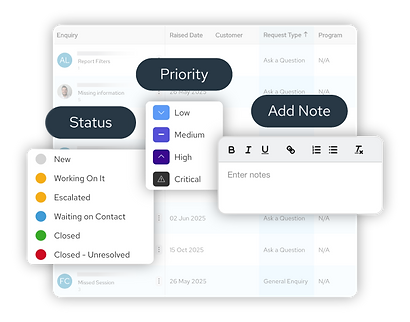
View all open enquiries with sortable columns for priority, date, and assignee
Update enquiry status, priority, and assigned agent
Add internal notes visible only to your team
Track full conversation history and all actions taken
Attach files to enquiries and responses


Ready to professionalise your learner support?
No more lost emails buried in personal inboxes. No more learners wondering if their question was received. Just organised, trackable, professional support that scales with your organisation.
When every enquiry has a clear owner and status, your team responds faster and learners feel confident their questions will be answered.
Get in touch to discuss how the Enquiries and Support Inbox can help you scale your business and deliver even greater impact to your enterprise customers.
